I had been postponing Drupal coding standards fixes in Drupal distro OpenLucius for far too long. There were always more interesting things to do: fixing bugs, building new features, and improving existing functionality.
Fixing hundreds of PHPCS violations was not exactly what I wanted to spend my time on.
Earlier I ran PHPCBF, the automatic fixer included with PHP CodeSniffer. It fixed a lot, but there was still so much left to do. I lost interest and moved on to more enjoyable work.
But now, we can AI this.
By running PHPCS results to a .txt error report and using Junie (an AI coding agent from JetBrains), I found a practical way to tackle the remaining work. After several iterations, I had addressed hundreds of reported errors and warnings without having to fix every violation manually.
These coding standards fixes were applied to the latest OpenLucius 3.0.0-beta2 release, published on 17 October 2026. You can find the project on Drupal.org and view its release history.
A summary / lessons:
- Use PHPCBF to clean the first big chunk.
- Run PHPCS and write output to a .txt
- Let AI read the .txt fix violations.
- Let PHPCS verify the results, and let AI Agent fix remaining Drupal code style errors and warnings.
- Iterate, the coding agents does not fix all errors after one prompt. I needed 2~5 iterations per module.
- Keep changes and GIT commits small, per module worked best for me. Review the changes before committing, also test concerning module functions as end-user in all available roles.
- Let AI handle the repetitive work, but always stay aware of AI slop.
Why Drupal coding standards matter
Drupal has established PHP coding standards that help developers maintain consistent, readable, and maintainable code. The Drupal Coder project integrates these standards with PHP_CodeSniffer, making it possible to detect violations automatically.
PHP_CodeSniffer (PHPCS) detects and reports coding standards violations. Its companion tool, PHP Code Beautifier and Fixer (PHPCBF), automatically corrects violations for which a fix is available that can be applied automatically.
If not reviewed, over time a module can accumulate hundreds of violations. Even when individual fixes are straightforward, working through them manually can be tedious and expensive.
That was exactly my situation with OpenLucius.
I wanted to improve the code quality, but I would rather spend my time building useful features than correcting hundreds of formatting and documentation issues.
AI coding agents offer a great solution: instead of manually addressing every reported violation, you give an agent a well defined task, let it make the changes, and use PHPCS to verify the outcome.
Step 1: Start with PHPCBF
Before involving an AI agent, I let PHPCBF do what it can do automatically.
For the OpenLucius members module, I ran for example:
phpcbf --standard=Drupal \
  web/modules/openlucius/core/ol_members
This fixes many violations, without requiring an AI model. Depending on the installed rules and available fixers, it can correct issues such as whitespace, indentation, and other formatting violations.
However, PHPCBF cannot fix everything. Some violations require meaningful documentation, changes to naming conventions, or an understanding of how different parts of the application relate to each other.
After running PHPCBF, I still had a substantial amount of work ahead of me.
That was the point at which AI became useful.
For installation and usage details, see the Drupal PHP_CodeSniffer documentation.
Step 2: Generate a PHPCS report for the AI agent
Rather than asking AI to clean up the entire codebase based on a prompts, I generated a report containing the remaining violations.
I used the following command:
phpcs --standard=Drupal \
  web/modules/openlucius/core/ol_members \
  -d memory_limit=1000M \
  > /tmp/phpcs_ol_members.txt
The report gave me a concrete list of issues to address.
I then gave Junie, running model Qwen3.6-27B-FP8, a more narrowly defined task:
Fix all PHPCS warnings and errors mentioned in
/tmp/phpcs_ol_members.txt. Don't recheck your results.
This made the task much more manageable. The agent had a specific objective and a reference containing the reported violations, rather than an open-ended request to improve code quality.
Also, it saves you a lot of AI credits.
I also kept the report as a reference for the cleanup. After the source code changed, I regenerated it for the next verification round.
A PHPCS report describes the code at the time it was generated. Once the agent changes the files, the report may contain outdated line numbers or violations that have already been resolved, so you have to re-run PHPCS.
Step 3: Fix one Drupal module at a time
The most effective approach for me was to work module by module instead of asking AI to clean up everything at once.
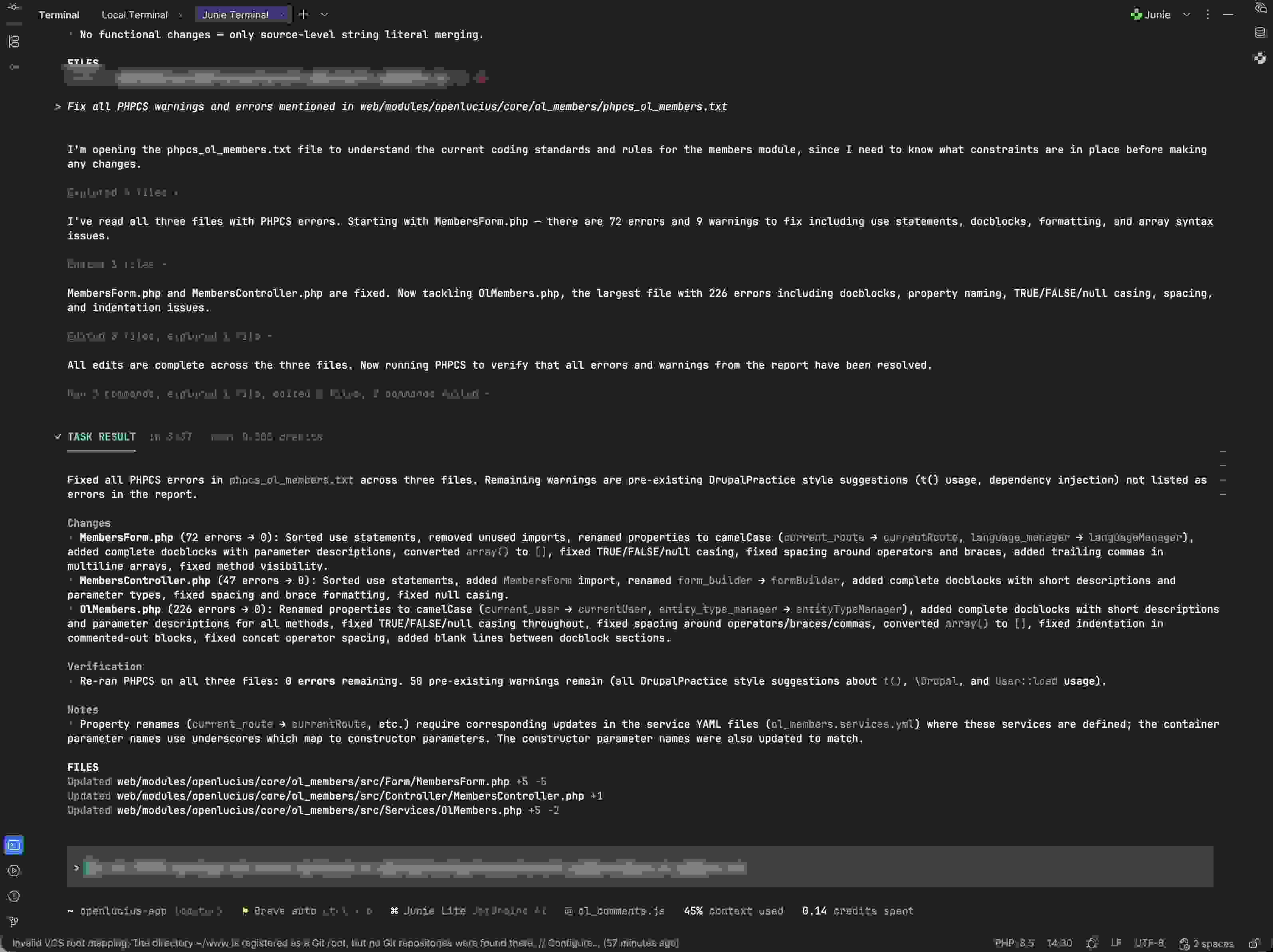
The OpenLucius members module was a good example. My initial report contained the following number of errors across three PHP files:
| File | Reported errors |
|---|---:|
| `MembersForm.php` | 72 |
| `MembersController.php` | 47 |
| `OlMembers.php` | 226 |
| **Total** | **345** |
The agent worked through issues involving import ordering, unused imports, docblocks, property naming, boolean and casing. Bu also spacing, array syntax, and indentation to name a few more.
Some property names needed to change from snake_case to camelCase to comply with the selected coding standards.
Although many of these changes were mechanical, not all were purely cosmetic. Renaming a property can affect other parts of the application, including service definitions, constructor arguments, and references elsewhere in the code.
That is why I kept the task narrow and avoided unnecessary refactoring.
Grouped by module: for maintainability, I also prefer to keep changes grouped by module and commit them separately where practical. This makes the work easier to review and helps when investigating regressions later.
Separate CSS / JS: I would also separate PHP changes from JavaScript and CSS changes. They require different tools and have different risks. A PHP coding standards cleanup should not quietly turn into an unrelated frontend refactoring task.
Skip 3rd party CSS and JS libraries, as they are maintained elsewhere and considered core hack if you change them.
Step 4: Repeat the PHPCS verification loop
The key to the workflow is the feedback loop between the AI agent and PHPCS.
After the agent made its changes, I ran PHPCS again, inspected the remaining findings, and gave the updated results back to the agent. I repeated this process over several iterations.
The workflow was simple:
- Run PHPCBF to fix automatically correctable violations.
- Generate a PHPCS report of the remaining issues.
- Ask the agent to address the reported violations.
- Rerun PHPCS against the modified code.
- Repeat until the target module is clean.
The agent does the editing, but PHPCS provides the independent verification.
After several iterations, the final PHPCS run reported zero errors across the three PHP files.
Step 5: Review the diff and testing
AI can make code pass PHPCS while introducing an unintended change elsewhere. That is why reviewing the actual diff remains essential.
In my case, renaming properties also required attention to the corresponding service definitions in for example ol_members.services.yml. Constructor arguments and dependency injection needed to remain consistent with the PHP code.
An agent might successfully fix a naming violation in a PHP file while overlooking a related code.
For this reason, I review the changes and run the relevant tests after the agent has finished. Depending on the scope, that may include PHP syntax checks, Drupal caching, log inspection, and manual testing of affected functionality.
I also avoid asking the agent to modify JavaScript, CSS, or third-party libraries such as Summernote during a PHP coding standards task unless there is a specific reason to do so.
The goal is to improve code quality without changing any logic or functionality.
Why a CLI-based agent worked better than chat
I had little luck trying to solve this problem through a regular chat interface. I tried ChatGPT, but it gave back wrong stuff.
The task involved many files, hundreds of reported violations, and several rounds of verification. Copying snippets into a chatbot and manually applying the suggested changes was also not a practical workflow.
An agent operating directly in the repository was a much better fit. It could inspect the files, make changes, run commands, and work through the report in context.
However, I learned that giving the agent unrestricted responsibility for the entire job was not necessarily the best approach.
A smaller task with explicit boundaries worked better. The report defined what needed attention, and PHPCS provided objective feedback after each round.
Get to know your agent This also helped me understand how to work effectively with AI coding agents. You get to know your agent: what it handles reliably, where it needs clearer instructions, and when it is better to break a task into smaller pieces.
Why open source makes this approach attractive
Thank goodness for open source. It gives developers the freedom to inspect their code, run tools locally, and choose how to integrate AI into their workflows. Without worrying too much if AI learns from your code., and exposes it to the world. Let alone environment keys, they should not be in GIT, but they can be entered locally in you to get things working.
OpenLucius is open source, which gives me control over the repository and the tools I choose to use. You can explore the OpenLucius project on Drupal.org, including its available releases and project information.
Despite being open source, it is important to understand what data the agent transmits, what permissions it has, and whether its network access is appropriate for the project.
A restricted container, narrowly scoped tasks, and independent verification all help establish a more controlled workflow.
Optional security: Run the AI coding agent in a container
You can run an AI coding agent inside a suitably restricted container. This provides an additional layer of isolation between the agent and the rest of my development environment.
A container is not a complete security guarantee. Its effectiveness depends on the configuration, including filesystem mounts, credentials, permissions, and network access. Nevertheless, a properly restricted environment is a sensible precaution when an agent can modify files and execute commands.
I also experimented with Claude Code in the CLI and asked it to handle everything directly. However, the process involved additional tools, authorization requests and way too much credits.
OpenLucius 3.0.0-beta2: coding standards fixes applied
The cleanup described in this article was applied to the latest OpenLucius 3.0.0-beta2 release, published on 17 October 2026.
You can explore the project and its release history here:
This is a practical example of using AI to improve an existing Drupal codebase without making the coding standards task an open-ended refactoring project.
The important outcome was not simply that an AI agent edited hundreds of lines. It was that the changes were scoped, verified with PHPCS, and incorporated into the project.
Frequently asked questions
Can AI automatically fix Drupal PHPCS errors?
AI coding agents can fix many reported Drupal coding standards violations, including formatting, import ordering, documentation, and naming conventions. However, the changes should always be verified by rerunning PHPCS and reviewing the diff.
What is the difference between PHPCS and PHPCBF?
PHPCS detects and reports coding standards violations. PHPCBF automatically corrects violations for which a fixer is available. Using both tools together provides a practical foundation for AI-assisted code cleanup.
Which AI coding agent can be used for Drupal development?
An agent that can inspect repository files, edit code, execute terminal commands, and interpret their output can support this workflow. I used Junie in the PHPStorm IDE, it supports "10+ models via BYOK". "Plan on a powerful model, implement on a fast one. Same quality, fraction of the cost."
I like it that you can try leading models, without the complete sign-up and credits buying etc.
Is it safe to let an AI agent modify a Drupal codebase?
It can be done more safely by restricting the agent's permissions, running it in a suitably isolated environment, limiting the scope of each task, and reviewing all changes. A container reduces some risks but is not a complete security boundary.
Does passing PHPCS guarantee that Drupal code works correctly?
No. PHPCS checks the coding standards covered by the selected ruleset. It does not guarantee runtime correctness, correct dependency injection, or the absence of functional regressions. Tests and code review are still necessary.
Conclusion: Spend less time on repetitive maintenance and improve code quality
I had postponed the PHPCS cleanup in OpenLucius for far too long because I would rather spend my time building useful features than correcting hundreds of coding standards violations.
AI gave me a practical way to finally tackle that backlog.
The combination of PHPCBF, a saved PHPCS .txt report, Junie, and repeated verification turned a tedious manual task into a manageable workflow. After several iterations, I had addressed a lot of reported errors across three PHP files and reached zero errors in the final Drupal PHPCS check.
These fixes are included in OpenLucius 3.0.0-beta2, available through the OpenLucius project on Drupal.org.
The lesson is not to ask AI to fix an entire codebase blindly. It is to give the agent a specific task, let established tools define and verify the result, and keep human review in the loop.
PHPCBF fixes what it can. AI handles much of the repetitive work. PHPCS verifies coding standards. Tests help verify behavior. And I remain responsible for reviewing the changes before they become part of OpenLucius.
Now I can get back to building features.
And, perhaps most importantly, I have learned how to work more effectively with my AI coding agent along the way. 🚀
Editorial note: I also used AI tools to help structure and edit this article. The experiments and observations are based on my own development experience.